
Start with your business, then compare competitors
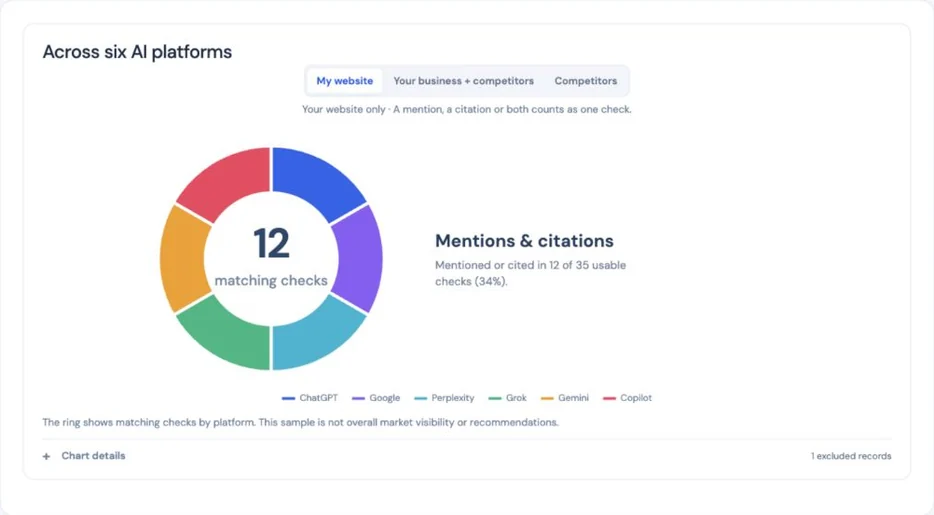
My website is selected when the chart first opens. The ring shows usable discovery checks that mentioned your business, cited your website, or did both. A check with both signals still counts once. The center shows matching checks; the sentence beside it gives the usable total and percentage. Provider colors identify where those matches appeared.
The visible filters let you choose My website, Your business + competitors or Competitors. A check naming several included businesses still counts once in the combined view. The separate website and competitor totals can overlap, so do not add them together. The six platform tiles continue to describe your own website.
Only matching checks appear in the ring. There is no unmentioned slice. Zero matches in a usable sample means no appearance was recorded; Not assessed means no usable checks with this measurement were saved. Chart details lists excluded records, including unavailable or unusable answers, invalid questions, historical research and questions naming your business. This is a saved sample, not overall market visibility or recommendations.
 Open larger image ↗
Compare actual cited page wording
In Competitors or a supported page review, open Compare the cited pages themselves. New reports can retain up to three public cited pages. Older reports can use Read up to 3 cited pages to save a dated capture without buying provider research. Captures are reused for seven days. The full saved AI answers and sources remain available.
Relevant passages are shown beside your saved first-party page. A source page describes that source’s offer, not your business. Verify the difference and your current page before editing. Blocked pages and partial captures cannot prove that an answer or feature is missing.
Compare missed questions and tested offerings
Inside Fresh question checks, the Competitor opportunities button opens a side panel showing questions where another business appeared and your business did not. Choose View finding to read one finding at a time. Back returns to your filtered list at the same reading position; Previous and Next move through the matching findings. You can read the matching saved answers or open a related existing page from that panel. Potential competitors still need a service and location check; an appearance does not explain why AI selected that business or establish a content gap.
Products & services groups the actual questions by topic and customer intent, such as finding a provider, cost or comparison. Its side panel shows unique questions, usable repeated checks and assessed appearances. One question is limited topic coverage, and offerings that were not tested remain unassessed. Platform and question-topic filters narrow these saved views.
Understand the role your business played
A full answer can show Business mentioned, Listed as an option, Recommended in this answer, Used as a source or Caution in the answer. These labels describe the saved provider wording, with a quote when available. An explicit recommendation requires clear supporting language; a name or link alone is not an endorsement. A featured-answer label applies to that excerpt, not every repeated check.
Review sources AI used
The Cited websites button in AI Visibility and Explore cited websites under Competitors → Questions & sources open the same side-panel view of external websites linked in usable independent answers. Sources cited across different questions appear first. The answer count includes repeated checks; the question count shows their separate topics. A domain counts once per check even when several of its pages are linked. Source totals overlap and are not market share.
Business appearances shows how often your business or other identified businesses appeared in answers that linked to each source. You can filter for your business, other businesses, or other businesses without yours, and search by a business name. These are appearances in AI answers, not verified mentions on the linked website. Questions explicitly naming a competing business do not count as its independent discovery. Publishers, community discussions, videos, associations, suppliers, product sellers, manuals and public authorities have separate source labels. For guide publishers, related product sellers are source context; comparable guides are labeled separately from direct business competitors. Ordinary service phrases are not counted as company names, and a brand already named in a question is excluded from its independent competitor appearances.
Review this website starts with why the source recurs and what to review next, followed by cited pages, answer dates, question examples and any retained public page captures inside that panel. A related page on your website appears only when a saved passage supports that comparison. Review suggestions identify details supported by the saved question and answer, such as delivery, storage or pricing. Source-specific previews prioritize the company behind the source; when no clear passage exists, use the full answer rather than a quote about another business. The suggested review does not establish missing content, listing eligibility or an outreach opportunity. Read this answer opens the selected saved reply first, with its sources and the other repeated replies below, inside the same panel. Back returns to the website you were reviewing; Previous and Next let you compare the available websites or platform replies. Your search, filters, page and reading position are kept while moving through and reopening these panels for the same account and report. Changing accounts or reports starts a separate view. Unknown source types and missing page text stay explicit, and opening this view makes no new requests to source websites.
Check business facts across different industries
Under Business details, confirm a service, product, price and currency, opening hours, service area, location, property size or identity using a page on your website. For hours, use a day as the subject and a clear time range as the fact. For prices, name the specific product or service and include the unit when relevant, such as $75 per visit.
The comparison flags explicit possible mismatches in usable discovery answers and named business descriptions against supported saved website facts or owner-confirmed facts. It does not assume ambiguous wording is wrong, edit your facts, or add business-description checks to discovery counts. Verify the current authoritative source and full answer before acting.
Choose questions without starting a check
Open AI question schedule, or Scheduled website updates in Billing & Plan, then select Review tracked questions. The side panel starts with suitable independent buyer questions from your saved report. Keep the questions that matter to your customers, or edit them using one complete question per line. Leave your business and its named programs out of discovery questions.
Save questions changes future scheduled rounds only. It does not enable a paused schedule, queue research or buy an answer. Start included research is a separate action for eligible active subscribers. If you have only a free scan, Start included website research prepares your first full report and its business-specific questions automatically. Once that research is saved, its suitable questions become the starting tracked set within your allowance. One-time reports and unscheduled test websites do not run recurring checks. Checks already underway retain their original questions.
Review questions before the first AI checks
When you submit a particular store, branch or location page, the report focuses on that location. A wider company page does not by itself confirm what this location offers. We keep national information and other-location pages as background unless a saved statement explicitly applies the offering here or to every location. A company homepage report can use company-wide evidence. Unknown local availability does not mean a service is unavailable.
The scan form includes an optional review step for reports with AI answer checks. Leave it off to use the reviewed automatic flow, or select it to confirm what we found your business does and which questions to check. Website research can finish while those AI checks wait for you. This does not enable scheduled updates.
We read core pages first, then use the remaining crawl allowance to fill gaps across services and product categories. A separate coverage review checks for offerings the original profile missed. When important coverage remains uncertain after one bounded preparation repair, the report asks for review before sending fresh AI questions. Missing or unreadable pages are left unassessed.
Choose Review AI questions in Overview or AI Visibility to open the standard side panel. Read the larger question text first, then expand its supporting passage when you need the evidence. Suggested questions that need local confirmation remain visible with their original sources. Edit questions lets you rewrite, add or remove up to ten questions or prompts of up to 500 characters each. Customers can choose any wording without staff or model approval. Save draft keeps your changes without starting checks. Use my questions saves and starts your chosen set within the original report allowance; it does not enable scheduled updates. Customer-selected wording is labeled separately from automatically verified website offerings. Questions that name your business remain in Business details and do not count as independent discovery. Return to suggested questions keeps your edits in history and makes the original set available again. Use selected questions starts the suggested subset you choose. Saving a concern starts no checks; the note stays separate from verified website facts. Once checks have started, this editor cannot replace the frozen batch or buy another batch. Original answers and sources stay saved.
Quick Wins brings up to three supported first actions together, prioritizing customer-facing pages and grouping repeated field checks. Each action explains the finding, the existing page to review, and how to check completion. Fewer than three is appropriate when the saved evidence supports fewer actions.
Review changes in the same side panel
What changed in AI answers? appears when a scheduled round has saved results. Review changes opens the comparison panel. Filter by business mentions, website citations or other cited businesses. Review finding opens one question and platform comparison; Back returns to your filtered list and reading position, while Previous and Next move between the matching findings.
Only matching questions, website, location context and collection method support a comparison. Different sample sizes and incomplete checks are kept separate from measured gains or losses. An edited question starts a new baseline; unchanged questions can keep their history. Earlier answers and sources remain available in AI Visibility under Scheduled checks.
A finding can also show page edits you recorded during that comparison period. These are website-wide timing context, not proof the page caused a visibility change. Missing improvement history does not erase or block the AI comparison.
Read consistency across scheduled checks
Scheduled rounds keep your chosen questions, website, country and platform fixed. New rounds repeat selected questions across all active platforms when the existing allowance supports it. Other questions still receive a first observation on every platform. No extra spending cap is added.
Completed checks are grouped under the question. Mixed results show variability. A change supported by repeated consistent checks has at least two assessable observations in both comparable rounds; a single observation is limited evidence. Unavailable answers are excluded rather than treated as lost visibility. Editing a question starts a separate series. Older accepted rounds keep their original request plan.
Read the six colored platform tiles
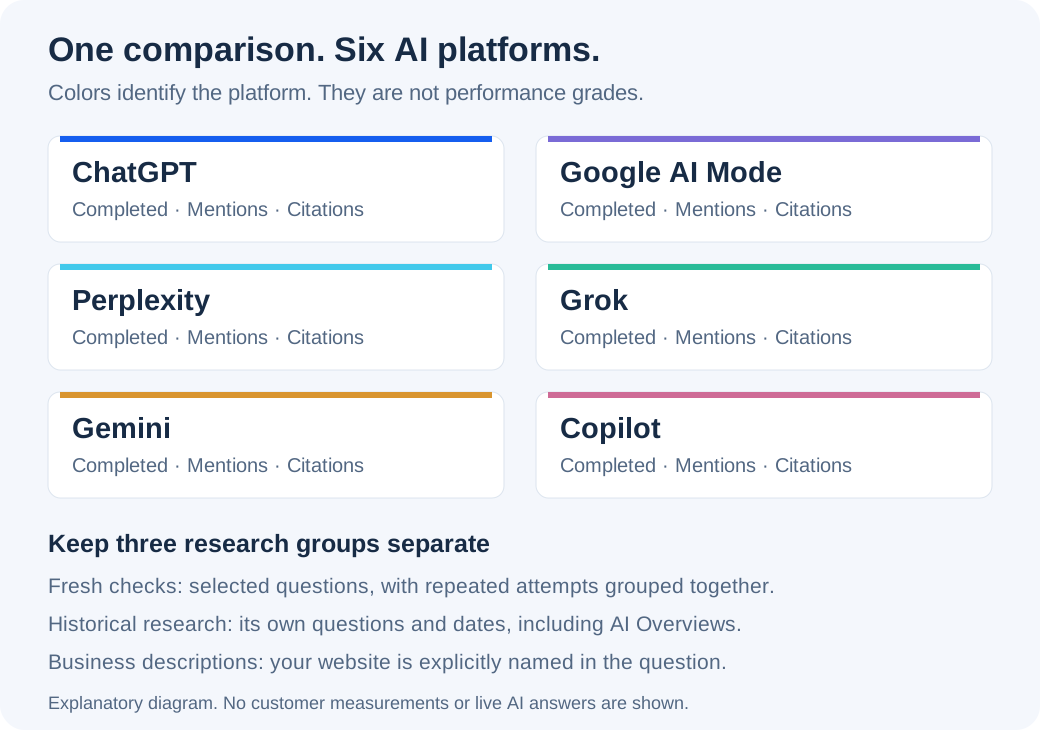
New paid reports check the same selected buyer questions across ChatGPT, Google AI Mode, Perplexity, Grok, Gemini and Copilot. Completed checks show business mentions and website citations separately.
Each tile now leads with a match-rate bar: the percentage of usable checks that named the business, linked to its website, or did both. A check counts once. The nearby counts give the sample size. A completed 0% differs from Not assessed or Temporarily paused. Mentions and citations remain available separately.
A tile labeled Temporarily paused means that platform was deliberately left out of this report’s new requests. It is not a failed check or zero visibility. The other platforms continue normally, and earlier saved answers remain available. A report with five active platforms can request 150 discovery checks for ten questions sampled three times, plus separate business-description checks.
Choose the website in the main dropdown and open AI Visibility. The Google tile groups AI Mode question checks with separately labeled AI Overview research. Select a platform to narrow the questions; choose All platforms to restore the comparison. The colors identify platforms, not a performance grade. The donut uses the same platform accents; the tiles below continue to show your own website even when the chart includes competitors.
 Open larger image ↗
Questions and completed checks are different counts
New report preparation targets up to ten distinct buyer questions supported by saved website evidence. A shorter list is used when fewer questions qualify; older saved reports keep their original questions. Ten questions, checked three times on each of six platforms, can produce 180 completed buyer checks if all attempts finish. That is still ten questions. Read the question and completed-check totals together.
Attempts are grouped under each question. “Mentioned in 2 of 3 completed checks” means two completed answers named the business. Failed, pending and unusable attempts do not increase the completed denominator. Unusable returned answers remain accessible through Full answers and sources.
| Measurement | Read it as |
|---|---|
| Completed checks | Attempts that returned usable completed answers in this saved question sample. Unusable returned answers are retained separately and excluded from mentions and citations. |
| Business mentions | Completed answer text named the business or its website domain. A citation alone does not count as a name mention. |
| Website citations | Completed answers linked to the business website in the returned sources. Several links in one answer still count as one cited check. |
| Pending, unavailable or uncollected | Separate states. These are not measured zero visibility. Missing source lists are not zero citations. |
Keep fresh, historical and named-business checks separate
Historical answers, including Google AI Overviews, keep their own questions and dates. Business-description checks explicitly name your website and do not demonstrate independent discovery. Older saved reports are not automatically backfilled.
Fresh question checks use the report’s selected buyer questions. Historical research can involve different questions, dates and sampling. A business-description check asks about your business by name, so it helps assess the description without showing that buyers discovered you independently. Do not add these groups into one fresh-check total.
Read the question and answer, then open More details
Each card starts with What we asked, followed by What AI answered. The answer is a short excerpt of one saved reply. Choose a platform on the card to compare replies, then select More details for the Full answers and sources side panel. Relevant answers involving your business appear first, followed by useful competitor examples. Historical research and questions naming your business stay in their separate views.
More details opens with an overview and a list of saved replies. Choose Read answer to read one reply at a time. The visible Answer, Sources and Original wording buttons keep the complete reply, every retained link and the exact original text easy to find. Pending or unusable checks remain available through View check.
Back to answer returns from Sources or Original wording to the reply. Back to answers returns to the list, and Back to saved questions returns to the page. Previous and Next move between replies when one is open, or platform comparisons from the overview. Your selected section and reading position are remembered within the same report and account. A platform comparison is not a new unique question. Historical excerpts can be incomplete. AI statements are third-party claims to verify, not facts we have independently established. A name mention, a citation and a recommendation are different observations.
Use supported comparisons to review existing pages
Start with the question-level finding, such as other businesses appearing without yours in 12 of 15 usable checks. The count is calculated from that report’s saved answers. Read what your existing page already says and use the specific checks to decide whether anything needs clarification. Open Review finding & page for the standard side panel, with Back and Previous/Next navigation. The list uses Show more page reviews rather than nested dropdowns. Useful excerpts highlight the business sentence; Full answers and sources retains the complete reply and original wording.
What should I review next? requires both a relevant saved answer and content from an examined page of your website. Read what the page already says before deciding whether to edit it. A citation elsewhere does not prove your page lacks the answer.
For guide publishers, a relevant educational page can support a review without the business offering the related installation or repair service. Keep useful content; change only a specific missing or unclear detail you confirm. No new page or rewrite is justified by a low count alone.
If a platform is still loading or has no fresh checks
Some answers may finish after the rest of your report and appear as they arrive. Pending, unavailable and uncollected checks are separate from a completed check with zero mentions or citations.
The rest of the report can remain usable while saved results arrive. A platform can show completed results alongside unavailable attempts. Older snapshots may have historical ChatGPT answers without fresh ChatGPT checks; this does not mean those historical answers were lost. Opening the snapshot does not purchase missing answers.
Six-platform checks are included in new website research dashboards. Separate scheduled Google and ChatGPT question samples follow your plan’s own schedule and allowance.
Useful links
Product documentation prepared with AI assistance and checked against the current application. If a step no longer matches your dashboard, let us know. Do not send passwords or connection keys.