
Start with the website already open
Check the website selected in the dashboard.
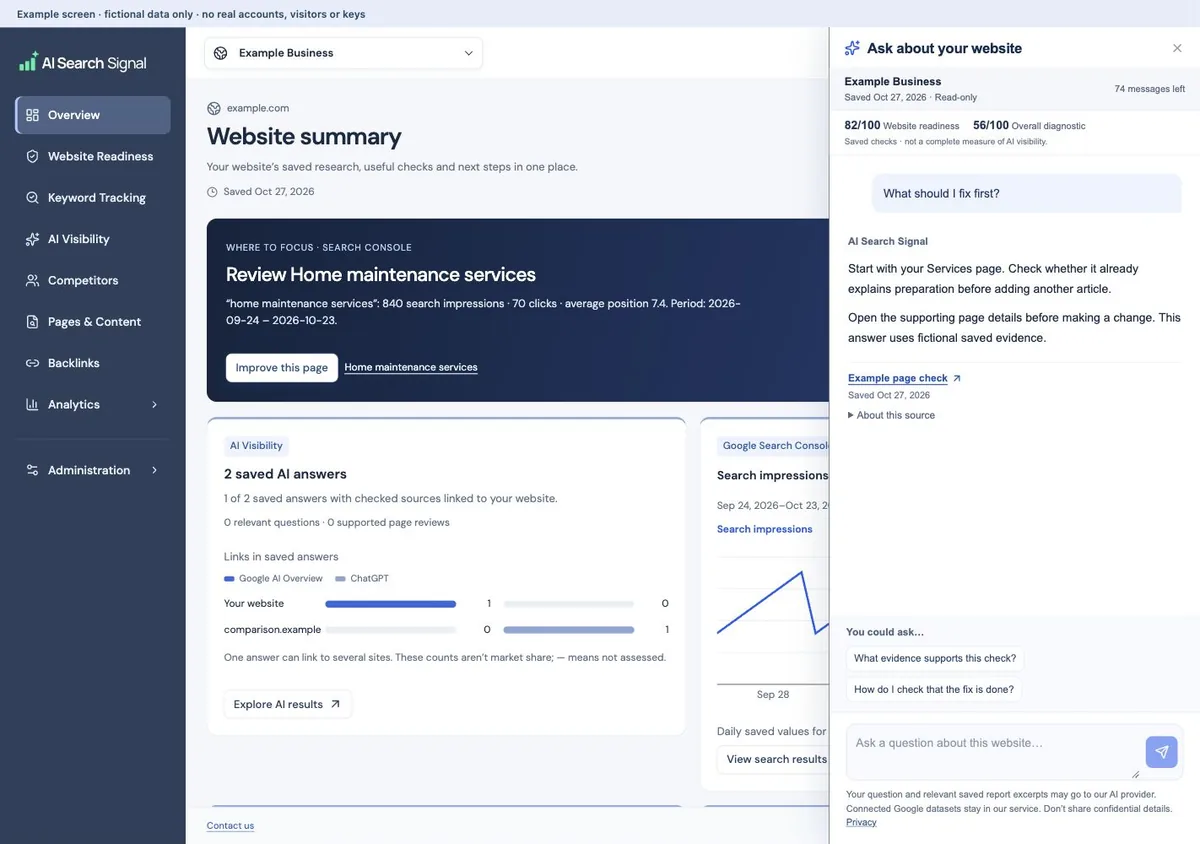
The helper follows the selected website and saved snapshot. Its button is in the top-right controls. There is no separate report selector inside the chat.
Open Ask about your website.
The chat shows the saved Website readiness and Overall diagnostic scores for this website. They are different checks; the AI Visibility tab presents answer samples rather than a new score. Suggested questions follow your current section, including the individual Analytics tabs. Switching pages keeps your conversation and typed draft. On AI Visibility, ask where your business appeared, what AI said, which existing pages support review, or how fresh and historical research differ. Keep custom questions about the selected website and saved information.
Open the supporting sources.
Answers start at the beginning and are brief by default. Read their supporting sources before acting, and ask for more detail when you need it.
 Open larger image ↗
Example screen The helper follows the selected website and snapshot, including its two separately labeled saved scores. Answers start at the beginning and stay brief; open sources or ask for more detail.
Ask a question that leads to a decision
After an answer, the helper offers a few follow-up questions based on available data. You can still type your own question. A suggested question is an invitation to explore, not evidence that a missing integration already contains data.
- “Where did my business appear in the saved AI answers?”
- “What did the AI platforms say about my business?”
- “What should I work on first?”
- “What evidence supports those suggested checks?”
- “How can I check whether a suggested fix is done?”
- “What’s the difference between page views and visits?”
- “Which search terms brought Google clicks?”
If it says the data is missing
The helper cannot reconstruct visits that were never recorded, invent a Search Console connection or fill an incomplete page excerpt with business facts. Ask what is available, or open the relevant setup guide. An unavailable number is not zero.
Choose the correct website before troubleshooting. Installing analytics now records future permitted activity; it cannot recover earlier visits. A saved report can lack an answer even when the current live page already has it. Check the page itself before editing.
What the helper does not do
It does not edit your website, start scans, refresh research, connect Google or change tracking permission. Asking a question does not turn on monitoring. You stay in control of those actions in the relevant tools.
Treat explanations and drafts as assistance, not proof of causation or verified business policy. The helper should say when a conclusion is unsupported. For example, goal completions alone cannot confirm sales, and a score change alone cannot prove the business improved.
Report excerpts needed for AI answers may be sent to our AI provider. Do not put passwords, customer details, payment information or API keys into the chat. Check the privacy policy for current data handling and the dashboard for message availability.
Useful links
Product documentation prepared with AI assistance and checked against the current application. If a step no longer matches your dashboard, let us know. Do not send passwords or connection keys.