GENERATIVE ENGINE OPTIMIZATION GEO

AI Search Intelligence for Your Website

Understand how AI and search systems read your website. Find useful fixes and see where to focus next.

Start with a free website scan

Create a free account to continue. No credit card needed.

Up to 50 public pages Free account, no card needed Saved in your dashboard
AI Search Signal

Know your next move.

Find clearer signals in AI answers, search rankings and your website.

Click or tap the video to pause or resume. You can also focus it and press Enter or Space.

An illustrated product video shows six AI platforms, saved answers and cited sources, keyword positions, website readiness and search trends using example data.

Choose what fits

What will you learn about your website?

See what’s working, what needs attention, and which changes are worth making. Start free, explore one dated dashboard, or choose a monthly plan to track progress.

Free scan

Website readiness

Check up to 50 public pages for issues with search access, page content and business details. Get useful next steps based on what we can confirm.

  • Access for search engines and AI crawlers
  • Page titles, descriptions and heading structure
  • Clear services, contact details and customer answers
  • Specific pages to review and practical fixes
Free account required. No credit card needed.Start with a free scan
From $19 / month

Monthly subscription

Keep your research, ranking history and next steps together. Choose a plan for scheduled checks and help acting on what you find.

  • Weekly keyword checks and monthly website research
  • Scheduled Google and ChatGPT answer samples
  • Signal Analytics, Google Search Console and Google Analytics
  • AI help explaining your saved results
  • In-dashboard AI writing with Growth and Business
Starter $19 · Growth $49 · Business $69 per month. Allowances vary by plan.Compare subscriptions

Use your saved data in other tools.

Our API lets your developer bring saved analysis and numbers into another app. MCP lets a compatible AI assistant read the same saved information. You choose which tool gets a connection key.

Included with Growth and Business. Starter does not include API or MCP access. These connections can only read your own saved data—not change your website, refresh data or start paid scans.
Inside new paid reports

Compare your business across six AI platforms.

New paid reports check the same selected buyer questions across ChatGPT, Google AI Mode, Perplexity, Grok, Gemini and Copilot. Completed checks show business mentions and website citations separately.

Start with My website in the donut. It counts usable checks that mention your business, cite your website, or do both. Each answer counts once. Use the visible filters to compare saved competitors, then read the answers behind the chart.

Google AI Overviews and other historical research stay separate from fresh checks. Some answers may finish after the rest of your report and appear as they arrive. Pending, unavailable and uncollected checks are separate from a completed check with zero mentions or citations. These are dated samples, not a measure of every AI answer.

How to read your AI results
A look inside

See how your dashboard brings it together.

Explore a simplified dashboard example. Start free with Website Readiness; the $12 dashboard adds outside research. Monthly plans add scheduled checks and tracking.

Example website dashboard

Maple Street Bike Repair

maplestreet.example · Fictional business
Example data

Explore a few dashboard sections below.

Overview · website readiness

Two useful checks. A clear place to start.

Your example site uses a secure connection and explains its bike repair services. Two things are worth checking: the Contact page returned a page-not-found error, and the Services page had no search description. Start with the Contact link. If it opens normally, no repair is needed.

AI Visibility · My website

Where did the example business appear?

Mentioned or cited in 4 of 6 usable example checks (67%). A mention and a citation in the same answer count once. This sample is not overall market visibility or recommendations.

Keyword Tracking · saved positions

Where do the example keywords rank?

Five invented keyword positions. Small baseline markers labeled 0 mean zero keywords in those ranges.

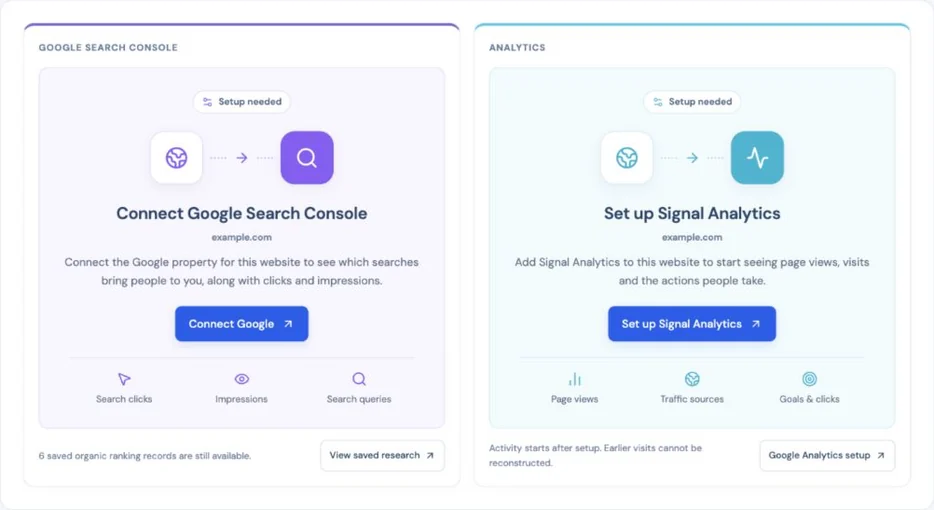
Example Overview setup tiles for Google Search Console and Signal Analytics, with clear connection actions.
Connect search and website activity with a monthly plan. Setup tiles guide you to the next step for the website selected in your dashboard. See how setup works.

Next useful steps

1
Check that customers can contact you

Contact page /contact

2
Give the Services page a clear search description

Services page /services

Illustrative data, not a live scan. Your findings depend on the pages checked and the outside data available. The full dashboard also has Keyword Tracking, Competitors, Backlinks and Analytics. Learn how to read the charts.

Try it with your website Start free. No credit card needed.
Google Search Console · Included with Starter, Growth and Business

Make sense of how people find you on Google.

Your connected website’s saved impression trend appears in Overview. Open Analytics → Google Search Console for search terms, pages, changes and indexing details, all for the website you’ve selected.

Searches and pages

What got noticed—and clicked?

See the search terms and pages Google returned. View search appearances alongside clicks, with an explanation of what each number means.

Changes over time

What’s gaining or losing clicks?

Choose 7, 30 or 90 days. Follow the trend and compare search terms and pages with the previous period. Missing figures stay labeled, not turned into zeros.

Page indexing

Has Google included your page?

Check a page’s saved indexing status and see when Google last crawled it, if available. This isn’t a live page test or a request for Google to index it.

Your Google data. A clearer place to read it.

Connect the Google account that has access to your website in Search Console. No tracking code to install. You approve read-only access—we can’t edit your website or submit pages for indexing.

Included with monthly plans after you connect a property you can access. Refresh Google’s available data in the dashboard; its numbers stay separate from readiness scores. Google’s data can be delayed or limited.
Signal Analytics · Included with Starter, Growth and Business

See what happens after someone reaches your website.

Open Analytics → Signal Analytics to follow recorded activity on your selected website. Keep visitor activity beside your search research, while reading each set of numbers separately.

Basic page counts

Which pages are getting read?

Follow the page-view graph and see which public pages get the most views. These automatic counts don’t identify visitors or connect their pages into a visit.

With permission

Where did a visit go?

Use the traffic-source pie to compare recorded visits by source, then open a visit’s pages in order. One visit can include several pages. This covers visitors who allowed detailed tracking, not everyone in your basic counts.

With permission

Did someone take the next step?

Track phone, email and external-link clicks, or set up a goal for a useful action. A click shows interest; it doesn’t confirm a completed call, enquiry or sale.

AI help in your dashboard

Not sure what your numbers mean? Just ask.

Ask our AI website helper to explain your saved analytics in plain English. Try “What’s the difference between page views and visits?” or “How do analytics goals work?”

Open “Ask about your website” in your dashboard. Included with Starter, Growth and Business. If data isn’t available, it will say so—nothing gets changed or refreshed.

Connect a website you manage.

Verify ownership and install your tracking code. Setup includes a privacy notice and opt-out. Connect your banner for detailed visits, and exclude your own browser from the counts. Review your website’s privacy requirements before enabling automatic counts.

Included with monthly plans after verification and installation. Not included with the free scan or $12 one-time dashboard. Collection pauses at your plan’s activity limit.
How it works

From a website check to useful next steps.

01

Create your free account

Enter your website and sign up or log in. Already signed in? We’ll take you to your dashboard.

02

Tell us about your business

Add your business details and run a free scan. Choose the $12 website dashboard for deeper research, or a monthly plan for tracking and ongoing updates.

03

Work from your dashboard

Free accounts start on Website Readiness. Full reports add Overview with AI, search and keyword charts where data is available. Then explore the sections that matter to your website. Review a keyword or page, choose your next step, and keep the supporting details nearby. Scans can take a few minutes.

Your scan stays private. Your saved results aren’t listed publicly or indexed. Share their links only with people you want to let view them.

Practical guides

Know what to do next, without the jargon.

Learn how to track website visits, choose useful keywords and write page titles that make sense to customers.

Browse all resources
AI Visibility Checker

See what your website gives AI systems to work with.

Start with a free readiness scan that checks access, structure, content clarity, trust, and schema. Your Website Readiness score describes these checks, not how often AI mentions you. The $12 dashboard and monthly plans add outside search and AI research where data is available.

Website readiness · exampleAccessClarityTrust

Evidence first. Unsupported findings stay labeled.

Keep the score in context

Website checks and actual search appearances are different measures. Missing data and failed requests stay separate from a genuine zero in a completed sample.

Compare answers and cited pages

New paid reports compare ChatGPT, Google AI Mode, Perplexity, Grok, Gemini and Copilot. Historical answers stay separate. Review each saved question, answer and cited page before deciding what to change.

Turn a useful finding into progress

Use Quick wins in Overview to choose a task and record your progress. Review a keyword or page, then use Create content or Improve this page. Growth and Business include AI writing in the dashboard.

Common questions

A few questions before you start?

What your dashboard includes, how monthly updates work, and where to start with search and AI visibility.

New to this? Start with the beginner guides.
What does the free scan check?

It checks up to 50 public pages for search access, page titles and descriptions, content clarity and business details. Your free account opens Website Readiness, with the score gauge, area bars, page checks and supporting details together. Overview appears after a full report purchase or with an active subscription. Create a free account first; no credit card is needed. Your readiness score describes these website checks, not how often you appear in Google or AI answers.

Start with a free scan
What do I get with the $12 website dashboard?

You get everything in the free scan, plus outside research where data is available: saved keyword and ranking observations, fresh question checks across six AI platforms, saved answers with cited sources, competitor comparisons and useful next steps. Use the AI Visibility donut and keyword bars to find a pattern, then open the saved answers and rows behind it. Separate dashboard sections keep the supporting details available without leaving the page. This is one dated analysis, without recurring monitoring or AI draft generation.

Explore the sample dashboard
Which AI platforms do new reports check?

New paid reports check ChatGPT, Google AI Mode, Perplexity, Grok, Gemini and Copilot using the same selected buyer questions. Repeated attempts are grouped under each question, so the number of completed checks is not the number of different questions. Some answers may finish after the rest of your report and appear as they arrive. Pending, unavailable and uncollected checks are separate from a completed check with zero mentions or citations. Historical answers, including Google AI Overviews, keep their own questions and dates. Business-description checks explicitly name your website and do not demonstrate independent discovery. Older saved reports are not automatically backfilled.

Understand AI Visibility results
What do monthly plans add?

Monthly plans add scheduled keyword checks, website research refreshes with six-platform AI checks, separate Google and ChatGPT samples, the website chatbot, Google Search Console, Signal Analytics and Google Analytics connections. Starter is $19/month, Growth is $49/month and Business is $69/month. Growth and Business also include AI writing inside the dashboard and read-only API/MCP access. Choose your plan, then set up its included research in Billing & Plan. You do not need to buy the $12 dashboard first. Allowances vary by plan; there are no automatic overage charges.

Compare plans and allowances
How often does my information update?

Monthly plans check tracked keywords weekly in the top 20, with a top-100 check replacing the first weekly round each month. Included website research refreshes monthly. Google and ChatGPT question samples run monthly on Starter and twice monthly on Growth and Business. Six-platform checks are included in new website research dashboards. Separate scheduled Google and ChatGPT question samples follow your plan’s own schedule and allowance. Set up your included updates in Billing & Plan; simply opening a saved dashboard does not buy fresh research. Refresh Google Search Console data on demand. Signal Analytics records activity after setup, within your plan’s limit.

See the update schedules
Does this check Google rankings and AI answers?

Yes, where results are available, and they stay separate. Keyword Tracking groups saved positions into bar charts and shows changes where comparable history exists; AI Visibility compares six AI platforms with business mentions, website citations and saved answers, keeping your website separate from comparison websites. The $12 dashboard is a dated snapshot; monthly plans add scheduled checks. A completed sample with zero appearances is different from a failed request or missing answer. None of these samples measures your entire real-world visibility.

Understand search visibility
How many keywords can I track?

Starter includes 100 tracked keywords for 1 website; Growth includes 200 for 1 website; Business includes 400 shared across 2 websites. Select useful terms from your saved research and follow their ranking history as checks build up. Select a keyword to bring up Create content or Improve this page when a relevant page is available. Saved research estimates, tracked positions and Google Search Console averages describe different things.

Check keyword limits
Can I create content without leaving the dashboard?

Yes. Growth includes 10 AI drafts per month and Business includes 20, with two targeted revisions per draft. Select a keyword or page, then choose Create content for a new draft or Improve this page for an existing page. Relevant saved information is carried into the editor so you can review the starting point. Check the facts, edit, save and export your work. AI writing does not publish to your website or include generated images. Starter and the $12 dashboard do not include AI draft generation.

See writing allowances
What will I find under Competitors and Backlinks?

Comparisons bring together the keyword, AI-answer, cited-page and link observations available in your saved research. Useful leads explain why a page or website may be worth reviewing. Customer-nominated comparison sites are labeled clearly; adding a name does not prove it is a direct competitor or that new research has been collected. Coverage can vary, so missing information is shown as missing rather than zero opportunity.

Explore how findings are organized
Can I track visitors to my website?

Yes. Signal Analytics is included with Starter, Growth and Business subscriptions, under Analytics in your dashboard. Verify a website you manage and install the tracking code to see basic page counts. With visitor permission, you can also see visits, the pages opened in order and selected clicks. Setup covers a privacy notice, opt-out and excluding your own browser. Review your website’s privacy requirements before enabling automatic counts. The free scan and $12 dashboard do not include ongoing analytics.

Learn how website tracking works
Can I connect my Google Search Console account?

Yes. Monthly subscribers can connect a Google account that has access to their website in Search Console. Overview shows Connect Google or Finish Google setup until matching data is available. Then the selected website’s chart appears; Analytics → Google Search Console has search terms, pages, changes and saved indexing checks. There’s no extra tracking code. Access is read-only: we can’t edit your website or submit pages for indexing. Google’s data can be delayed or incomplete, and it stays separate from readiness scores.

See the Search Console features
How is Search Console different from Signal Analytics?

Search Console shows how your website appeared in Google Search and which results received clicks. Signal Analytics records activity after someone reaches your site, such as page views and, with permission, visits and selected clicks. You can use both under Analytics with any monthly plan. They measure different things, so their totals won’t necessarily match.

Compare the two analytics tools
Do I need technical experience?

You can read your dashboard and review its suggested checks without being a developer. Start with Website Readiness on a free account, or Quick wins in Overview on a full report, open the supporting details and record your progress as you work. Some changes, such as a page title, may be available in your website builder. Others need your website manager. Analytics installation requires access to website settings or code; setup explains what to give the person who manages it.

Browse the beginner guides
What do the charts show?

AI Visibility starts with My website. Its donut shows usable checks that mentioned your business or cited your website, counting an answer with both signals once. Visible filters let you compare saved competitors. Keyword bars group saved positions into rank ranges; movement charts require comparable earlier checks. Website Readiness has a score gauge and area bars. Backlinks and connected analytics have their own comparison and source charts where data is available. Every chart keeps its dates and scope. A genuine zero stays zero; missing data does not become a positive result.

Learn how to read the charts
Which keywords should I use on my website?

Start with phrases that describe what you actually offer and the questions your customers need answered. Match each topic to a relevant page and use the words naturally in its title, headings and content. Check your existing pages before creating another one for a slightly different wording. Estimated search volume can help with research, but it is not a promise of visits.

Choose keywords that fit your business
How do I write a good SEO page title?

Describe what that specific page is about, then add a useful detail or your business name if it helps. Keep it clear and concise, and avoid repeating the same keywords. Only include services, locations or claims the page supports. Your saved SEO title and the large heading on the page are different things, and Google may show different title text in its results.

See simple page-title examples
What’s the difference between SEO and AI search visibility?

SEO helps people and search engines find and understand your website. AI search visibility looks at how your business or website appears in AI answers, including mentions and source links. They overlap, but a Google ranking, a website link and a recommendation are not the same result. Clear, useful pages can support both; neither approach guarantees a particular placement.

Understand AI SEO and traditional SEO