
This guide distinguishes documented platform guidance from practical observations. AI and search platforms can change, and no placement or recommendation is guaranteed.
Before you start
Connect one important page to relevant answers and test the journey on a phone.
An internal link sends someone to another page on your own website. A link from Services to your estimate instructions is internal; a link to an independent supplier is external. Start where a reader naturally needs more information.
Google recommends crawlable links with meaningful text. For a website person, that usually means an ordinary HTML link with an href pointing to a real URL—not a click handler on an unlinked word. You do not need to learn HTML to add a link with a normal website editor.
- A short list of public pages on your own website.
- Permission to edit links, or a handoff to your website person.
- You can complete this without buying an AI Search Signal report.
Step by step: connect one customer journey
Choose a real journey, such as Homepage → Tune-Ups → Estimate instructions → Booking. Keep only the pages that are actually helpful.
Pick an important destination
Choose a page a customer should be able to find, such as a core service or instructions for requesting an estimate. Copy its public URL from your browser. Do not use the editor’s private preview address, a login link or a URL containing an access token.
Find a sensible place to introduce it
Read your homepage and related pages. Where would this answer save the reader a search? For estimate instructions, the service page’s pricing paragraph is a natural place. A completely unrelated article is not. Check existing menus and links first so you do not duplicate an already clear route.
Write link text that describes the destination
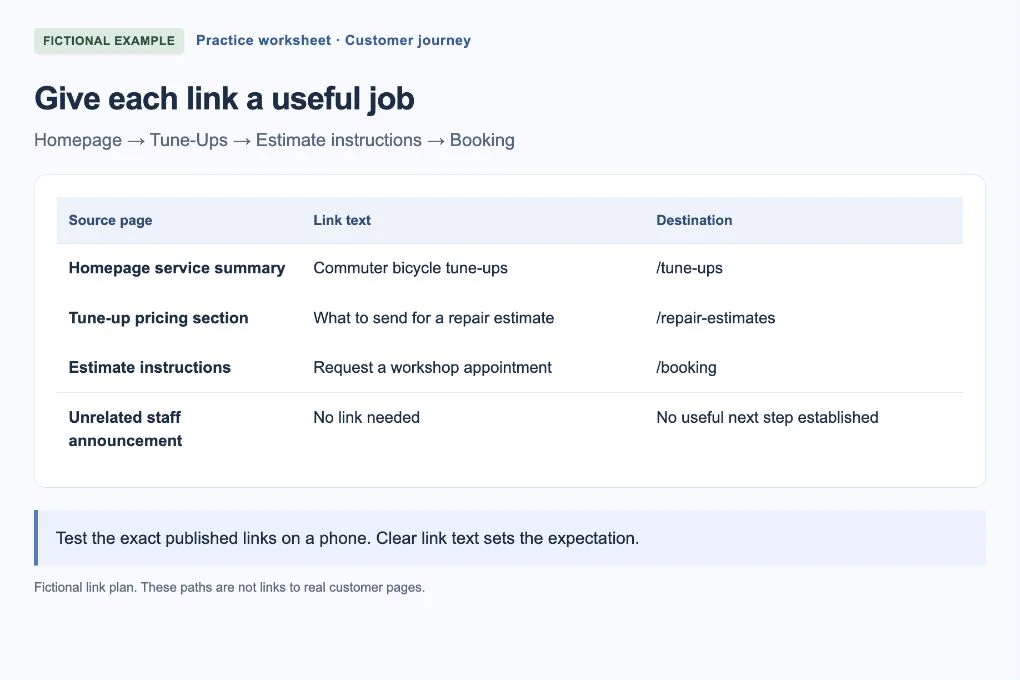
Use “what to send for a repair estimate” rather than “click here.” Read just the linked words: would you know what you will get? The example worksheet gives each link a job; it is not a target number of links.
 Open larger image ↗
Example screen Fictional link plan. Each link has a customer purpose and a specific destination. This is a worksheet screenshot, not a live website audit. Add the link in your editor
Select the useful words, choose the editor’s link control and paste the public URL. For navigation within your own site, opening in the same tab is normally the least surprising choice. Save and publish the source page. Do not change the destination URL just to make the link wording match.
Test the exact published link
Open the source page on a phone and tap the link you added. Does the correct page load, and does it answer the question the text promised? Use Back to return. Then test the next action, such as opening booking instructions, without sending a real enquiry. If a redirect goes somewhere unexpected, fix the destination with your website person.
Make the new page findable from elsewhere
If the destination is new and important, give it a useful route from an established related page or navigation area. Also check its own next-step links. You are building a readable path, not adding every page to the footer. Record the source and destination so you can recheck them after a future redesign.
Worked example: one service, two different next questions
Fictional example: the tune-up page explains included work, while a separate estimate page explains photos to send. The service page can summarize the process and link to the full instructions. It does not need to repeat the entire guide.
| Where the reader is | What they need next | Useful link text |
|---|---|---|
| Homepage service summary | Learn about the tune-up service | Commuter bicycle tune-ups |
| Tune-up pricing section | Understand the estimate process | What to send for a repair estimate |
| Estimate instructions | Know how to request an appointment | Request a workshop appointment |
| Unrelated staff announcement | No clear connection to estimate instructions | No new link needed |
What not to turn into a linking task
Do not add a new page just because you need something to link to. If the current service page already answers a question well, link directly to that page or a stable section on it. Slight keyword variations do not require separate destinations.
There is no universal ideal link count. Our practical check is whether a link helps the reader at that point. Avoid forcing repeated location-and-service phrases into every anchor or making links look like ordinary unclickable text. Important links should remain recognizable and usable with a keyboard.
If you get stuck
The page opens from the menu, but not from the article
Edit the specific article link. An old copied URL can be wrong even when the menu is correct. Retest the original link after publishing.
There are two pages answering the same thing
Compare their purpose and content first. You may only need to improve the existing page. Merging pages and adding redirects is a separate change to plan carefully, not a reason to delete one immediately.
The destination is a PDF or an external booking tool
Say so in the link text or nearby sentence. Check the experience on a phone and do not send private account or customer URLs to the public page.
Your finish-line check
A new visitor can reach the important page from a relevant starting point, understand each link before clicking and complete the next step without a broken or misleading route. Save your short link plan for future checks.