
This guide distinguishes documented platform guidance from practical observations. AI and search platforms can change, and no placement or recommendation is guaranteed.
Before you start
Leave with a short list of useful customer questions, each assigned to a relevant page.
- A list of services or products you genuinely offer and the area you serve.
- Your existing pages and a simple document or spreadsheet. You can do this without buying keyword data.
Start with what you actually offer
A keyword is a word or phrase someone might type into a search engine. A useful choice describes a service, product or question that your business can genuinely help with. It is not a phrase to repeat everywhere on your website.
Write down your real offers, who they are for and where you serve customers. Then add the buying questions you can answer: what is included, what affects the price, how to choose, or how to book. Treat your first list as ideas, not proof that people search for every phrase.
Step by step: build a small keyword-to-page plan
Use your own offers and customer conversations as the starting point. The example phrases are ideas for a fictional workshop, not measured demand.
Write down the offer before the keyword.
Start with one real service, such as bicycle tune-ups. Add who it serves and any genuine location limits. Leave out services you might offer someday.
List the questions you hear before a booking.
Try “What is included?”, “What affects the cost?” and “How do I arrange it?” Use the language customers actually use. Do not attach a search-volume number unless you have a source and its market.
Add your own Google queries if available.
In Google Search Console itself, open Performance → Search results, choose a date range and select Queries below the chart. Use a Pages filter to focus on a specific page. Record the period and active filters; missing query rows do not mean nobody searched. You do not need our integration to do this.
Group questions with the same purpose.
“Bike tune-up cost” and “How much is a bicycle tune-up?” usually belong to one pricing question. Read the existing tune-up page and its linked FAQ before deciding whether a new page is needed.
 Open larger image ↗
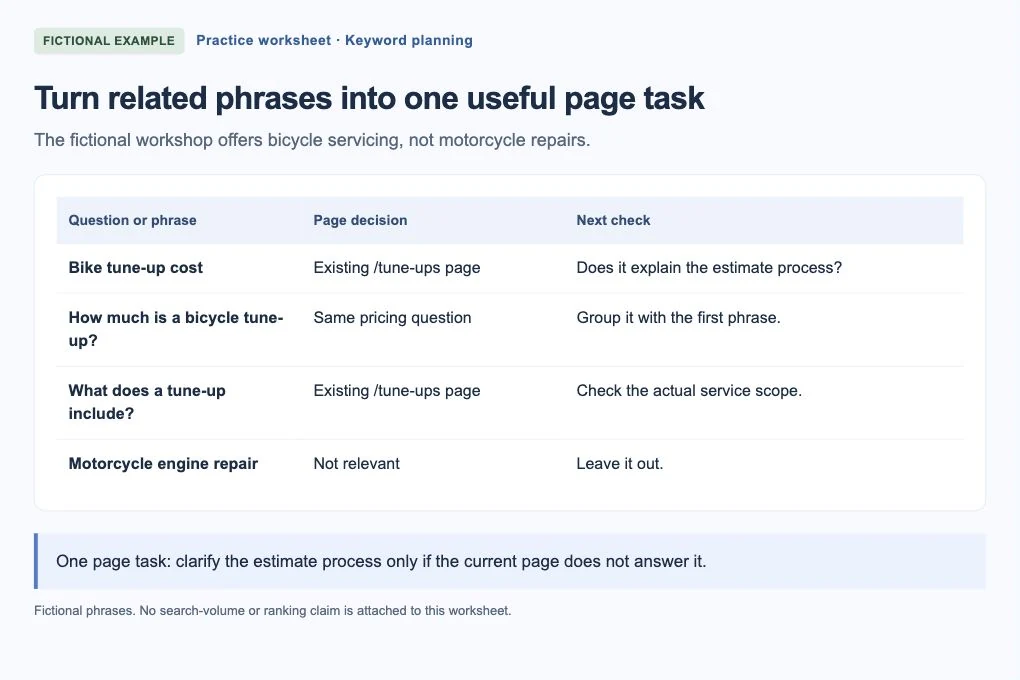
Example screen Fictional planning worksheet. Related questions share an existing page; an unrelated motorcycle phrase is left out. These phrases have no claimed search volume. Choose one small page task.
Record the question, existing page, what you found and the next check. If the answer is already clear, write “No change needed.” If pricing depends on the bike, explain the real estimate process instead of inventing a fixed price.
Read the edited page as a customer.
Use the topic naturally in a clear title, heading and answer where it helps. Check that a person can understand the service and reach the next step. Repeating every keyword variation is not the goal.
Match the phrase to the customer’s purpose
This is a fictional example. Maple Street Bike Repair offers bicycle servicing in Cedar Falls. A phrase about car tyre replacement would not fit just because both involve tyres. A bike-buying comparison may also be the wrong task for a repair-service page.
Ask whether the person searching wants to buy, compare, learn or find a nearby provider. Then choose the page that can satisfy that purpose. Keep similar wordings together when they ask for the same thing.
| Phrase to consider | Useful page decision |
|---|---|
| bicycle tune-up Cedar Falls | Review the existing tune-up service page if that is a real service and service area |
| what is included in a bike tune-up | Explain the actual scope on that same page; do not invent a package |
| bike tune-up cost / how much is a bicycle tune-up | One pricing question to answer with the business’s real pricing or estimate process |
| motorcycle engine repair | Leave it out if the workshop does not offer this service |
Check ideas against real evidence
Your own customer conversations can help you choose language, but they are not a search-volume study. Search Console can show saved queries associated with your website’s Google Search performance. Those observations are different from phrases a research tool suggests or questions generated from your page content.
A keyword tool’s search volume is an estimate for a phrase and market, not visits to your website or a promise of enquiries. Check what its competition measure means too: Google Ads competition describes advertiser competition, not organic ranking difficulty. Missing figures are unknown, not zero demand.
Choose an existing page before creating another one
For each useful question, find the page that already answers it or should help that customer. Read the page’s main content, not just a menu link. If the answer is already clear, keep it. Do not create another article just to target a slightly different wording.
If you cannot find the answer on the pages you checked, record that limited conclusion. A page you have not read might already answer it. Only plan a new page when the question fits the business, needs a distinct answer and is not better served by an existing page.
- One topic: bicycle tune-up pricing.
- Likely page to review: the existing tune-up service page.
- Check: can someone understand the actual price, or which details are needed for an estimate?
- Next step: change only the part that leaves that question unanswered.
Use the words where they help the reader
Put a clear description of the topic in the page title and main heading. Explain it naturally in the page, then use helpful section headings for the questions that belong there. Links to the page should say what someone will find.
You do not need to fit every variation into the title or hit a keyword-density target. Google does not use the meta keywords tag, and its guidance warns against excessive repetition. Read the page aloud: if the same phrase keeps interrupting the meaning, remove it.
Turn the shortlist into a manageable plan
Keep a small worksheet with the phrase, customer purpose, relevant page, evidence and next check. A phrase with a large estimate but the wrong service or location should not outrank a relevant question you can answer well.
AI Search Signal’s free scan can help you review the public pages you already have. Keyword Tracking uses your saved research to connect relevant phrases with page decisions. Planned subscription checks add comparable positions when activated; reopening the dashboard does not buy another research refresh. Neither makes a keyword a guaranteed source of traffic.
If you get stuck
The largest-volume term describes another service.
Leave it out. A large estimate does not make an irrelevant search useful.
Several phrases seem to need identical answers.
Group them on the same page unless customers genuinely need distinct pages. Do not create near-duplicates just to vary a phrase.
Your finish-line check
Each selected question fits a real offer, points to an examined page and has a specific next step—or a clear decision to leave the page alone.
Keep a note of the page or setup you checked, what you changed and the date. You can follow the written steps without buying an AI Search Signal report. Any optional subscription tools are labeled separately.
Frequently asked questions
Should every page target the same keyword?
No. Give each page a clear purpose. Related pages can share natural language, but changing a few words does not justify creating several pages that answer the same question.
Should I choose the highest-volume keyword?
Not automatically. First check whether it matches your offer, location and customer’s purpose. The volume is an estimate, not a forecast of visits or sales.