
This guide distinguishes documented platform guidance from practical observations. AI and search platforms can change, and no placement or recommendation is guaranteed.
Before you start
Classify one URL, save the evidence and choose an appropriate next check without exposing private pages.
Indexing means Google has stored a page for possible use in search results; it does not guarantee a particular ranking. Not every URL should be indexed. Private dashboards, account pages and duplicate versions may correctly stay out of search.
Use URL Inspection for an individual page and the Page indexing report for broader patterns. The inspection’s saved result describes Google’s recorded version, which may predate your latest edit. A live test is a separate check, not a guarantee of indexing.
- The exact public URL and access to its Search Console property.
- A website manager for technical changes you do not understand.
- You can complete this without buying an AI Search Signal report.
Step by step: investigate one URL safely
Do not begin by removing all exclusions. Start with a page customers genuinely need to discover in search.
Decide whether this URL should appear publicly
Choose a real service, product or useful guide. Exclude private account URLs, order confirmations and duplicate tracking variants from this exercise. If the content must stay private, keep proper access controls; a search exclusion is not a substitute for security.
Inspect the exact address in Search Console
Paste the full URL into URL Inspection in the correct property. Save the result, the reason, inspection date, last crawl time and Google-selected canonical when available. A canonical is the address Google treats as the main version. Write “unavailable” for details that are not shown rather than guessing.
Compare the status with what you intended
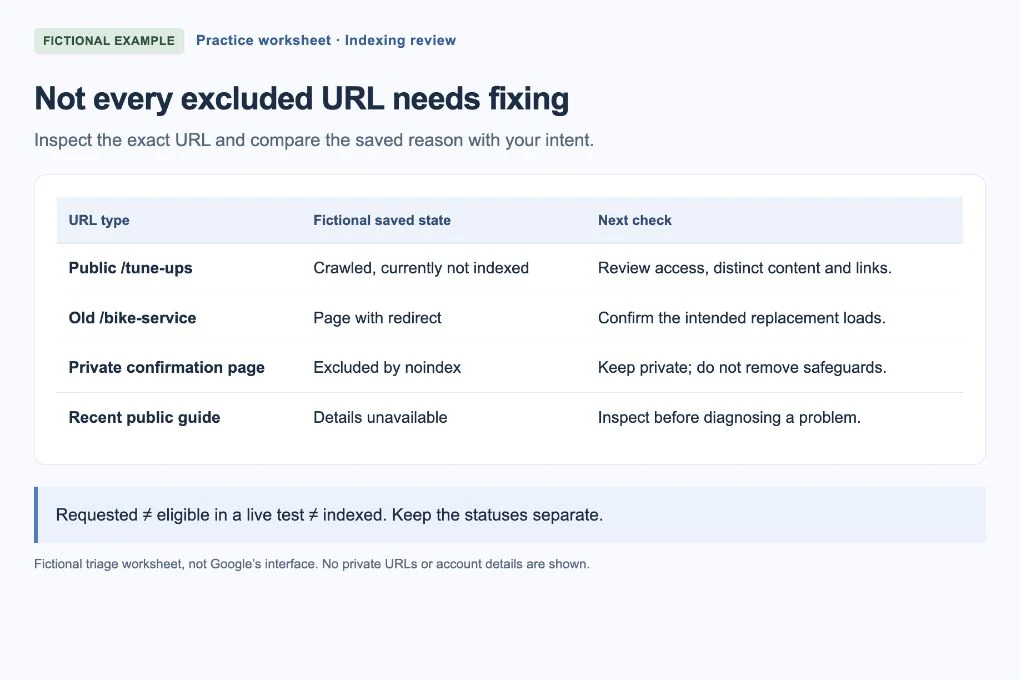
Check whether the URL redirects, is a duplicate, has a noindex instruction, is blocked or has been discovered or crawled without indexing. These call for different checks. The fictional worksheet shows why an expected redirect is not the same task as a missing public service page.
 Open larger image ↗
Example screen Fictional triage worksheet, not Google’s interface. Index only appropriate public pages; an excluded URL is not automatically a problem. Check what a visitor and Google can reach
Open the public URL while signed out. Confirm that the intended content loads without an account. If the saved crawl predates a repair, use Test live URL in Google for a current access check. Ask your website person to investigate response errors, robots rules, noindex or an unexpected canonical; do not remove privacy or duplicate controls blindly.
For an accessible page, review its purpose and routes
If Google can access it but has not indexed it, compare it with your other pages. Does it contain a distinct, useful answer, or mostly repeat another page? Is it linked from a relevant public page and included in the sitemap when appropriate? Improve a verified weakness rather than adding filler or changing the URL to force a fresh attempt.
Recheck the actual repair and record the follow-up
After a supported change, verify that the original issue is resolved. For an appropriate public page, use Request indexing if Google offers it and you have permission. Repeated requests do not guarantee faster inclusion. Record when you requested it, then check again later; an eligible live test and a submitted request are not an indexed result.
What common statuses suggest checking next
This is a triage aid, not a diagnosis of your website. Read the exact reason in your own report and the linked Google documentation before making technical changes.
| Saved state | What to check | Avoid this shortcut |
|---|---|---|
| Page with redirect | Does it lead to the intended public replacement? Inspect that destination if needed. | Do not demand that the old redirect URL be indexed. |
| Excluded by noindex | Was exclusion intentional? Ask the site manager if this is a public page that should be discoverable. | Do not remove noindex from every page. |
| Duplicate / another canonical chosen | Are these genuinely duplicate versions? Compare the intended main URL. | Do not create another copy to bypass the decision. |
| Discovered, currently not indexed | Check findability, access and whether the page is new; Google has not yet crawled this recorded URL. | Do not invent a quality diagnosis from this status alone. |
| Crawled, currently not indexed | Check useful distinct content and duplicate versions; the status alone does not identify the cause. | Do not treat a longer word count as a guaranteed fix. |
| Server error or access failure | Have the website person reproduce and repair the specific access problem. | Do not submit requests repeatedly instead of fixing access. |
A useful handoff to your website person
Try this: “Please check [public URL]. Search Console recorded [exact reason] at [date], with last crawl [date or unavailable]. This service page should be public. The signed-out page [loads or fails]. Please confirm the response, indexing directives and intended main URL before changing them.”
Keep private tokens, customer details and signed-in URLs out of the handoff. Share screenshots only after removing account emails and any sensitive URL parameters. You can describe the status in text instead.
If you get stuck
The page was published today
A new page may not have been processed yet. Check a working public link, sitemap inclusion where appropriate and the saved dates. You cannot promise when Google will index it.
A site: search does not show it
Use the exact URL in URL Inspection before concluding it is absent. A search query is not a complete inventory or a diagnosis.
It says indexed but there are no clicks
Indexing and search performance are different. Check relevant date ranges and queries in Performance; an indexed page is not guaranteed impressions or clicks.
Your finish-line check
You know whether the URL should be public, have saved its actual status and have either confirmed an expected exclusion or identified a specific next check. Keep “requested,” “eligible in a live test” and “indexed” separate. Stop when there is no supported repair to make.