
This guide distinguishes documented platform guidance from practical observations. AI and search platforms can change, and no placement or recommendation is guaranteed.
Before you start
Publish one accurate page description and know what you can—and cannot—expect Google to show.
A meta description is a short summary stored in a page’s settings. It is different from the page title and the headline people read after opening the page. Google may use it for the small description beneath a search result, but can use text from the page instead.
- Access to your website’s page settings, or help from its manager.
- One public page and the facts it actually contains.
- You can complete this without buying an AI Search Signal report.
- Choose one useful page, such as a service, product or contact page.
- Keep the current title, description and URL in a note before editing.
- If the current description is already clear and accurate, you may not need to change it.
Step by step: write and publish one description
Start with the page, not the keyword tool. Here is a repeatable editing process you can use in most website builders.
Read the page as a new customer
Write down its main job: book a tune-up, compare a product, learn a process or contact the business. List two facts a visitor can confirm on the page. If you cannot explain the page’s purpose in a sentence, fix that confusion before writing its description.
Draft a plain-language invitation
Try: “[What this page helps with]. Find [useful detail] and [next step].” Use your own wording. For a service, include the actual service area only if it matters and the business serves it. Leave out “best,” “guaranteed” and invented prices or turnaround times.
Compare the draft with the page
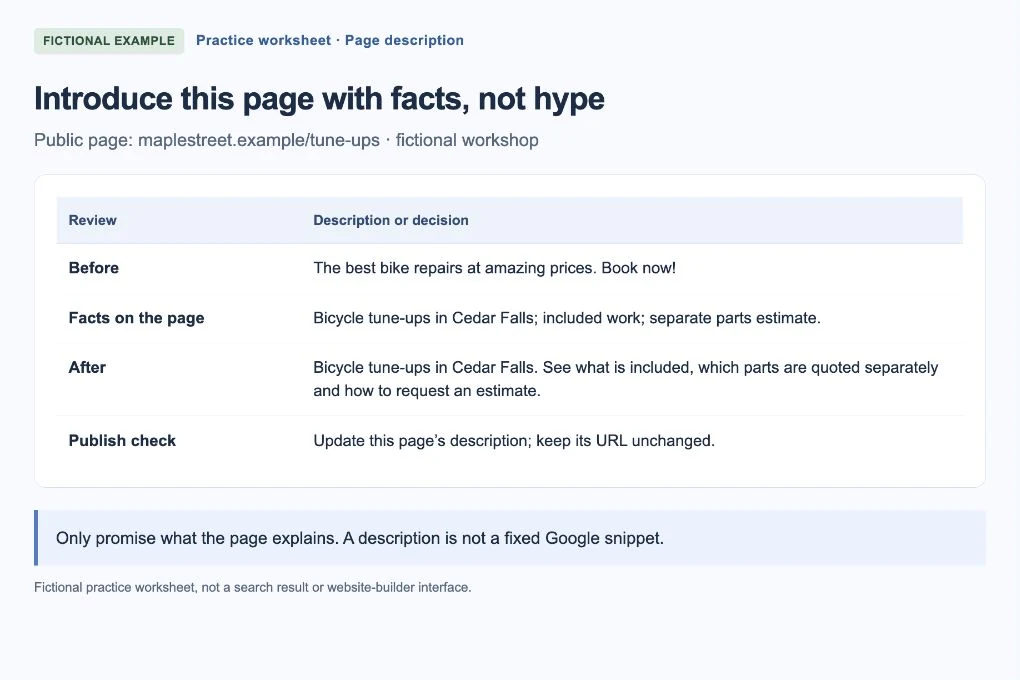
In the fictional example below, the tune-up page really explains included work and the estimate process. The description is useful because it tells readers those things. A page that does not explain estimates should not promise them in its description.
 Open larger image ↗
Example screen Fictional practice worksheet, not a Google result or website-builder screen. The revised description uses only facts supplied for this example; Google may show different text. Find the page-level SEO setting
Open that page in your website editor and look for SEO, Search appearance or Meta description. Labels vary by platform and plugin; use your builder’s own help if needed. Edit the description for this page, not a site-wide setting that would replace every page’s summary. Do not change the URL.
Save, publish and check the public page
Reopen the public URL in a new tab. Confirm the page still works and the editor saved the right description. For an extra check in a desktop browser, use View page source and search for name="description". Ask your website person to investigate if two conflicting description tags appear; a preview inside the editor is not proof of the published tag.
Keep a small change record
Save the URL, old and new text, and publication date. Later, compare relevant page and query data in Search Console using the same filters. If Google shows another snippet, first check whether it answers that search better. Do not keep rewriting a truthful description just to chase one screenshot.
Worked examples: useful detail beats a sales pitch
All businesses and policies below are fictional. Replace the facts, not just the business name.
| Page | Too vague or unsupported | A more useful description |
|---|---|---|
| Tune-up service | The best bike repairs at amazing prices. Book now! | Bicycle tune-ups in Cedar Falls. See what is included, which parts are quoted separately and how to request an estimate. |
| Estimate instructions | Bike repair, bikes, repairs, cycle repairs, cheap repairs. | Learn which bicycle details and damage photos to send when requesting a repair estimate from Maple Street Bike Repair. |
| Contact | Welcome to our website. | Contact Maple Street Bike Repair about a commuter bicycle repair. Find appointment instructions and the information to include in your enquiry. |
How long should it be?
Aim for a compact, readable summary, not a magic character count. Google does not give a fixed description-length limit; displayed snippets can be shortened to fit the device. Put the important meaning first so a shorter display still makes sense.
Our editing test: read the description aloud. Does it say what the page offers, use ordinary language and stop when the job is done? Remove repeated phrases before removing useful information. Give different pages their own accurate summaries rather than copying the homepage description everywhere.
If you get stuck
Google shows different wording
That can happen even when the tag is correct. Check the published tag and the search question. Your description is a suggestion, not a display command.
The same text appears on every page
Look for a global SEO template or default description. Ask the website manager how page-level overrides work before replacing the template.
There is no description field
Search your builder’s help for meta description or SEO settings. Do not paste a meta tag into the visible page text or install several overlapping SEO tools.
Your finish-line check
You are done when one published page has an accurate, distinct description, its URL still works and you have saved the change date. A different Google snippet is not, by itself, a failed implementation. Next, review the page title only if it needs a separate improvement.
Frequently asked questions
Can a meta description guarantee more clicks?
No. It can help set an accurate expectation, but search position, the query, competing results and Google’s chosen snippet all affect what happens.
Should I add the same keyword several times?
No. Explain the page naturally. A list of repeated keywords is less helpful to a customer than the actual service, useful detail and next step.