
This guide distinguishes documented platform guidance from practical observations. AI and search platforms can change, and no placement or recommendation is guaranteed.
Before you start
Make one evidence-backed page-review task using Google’s free tool, or record why no change is supported yet.
Open Google Search Console itself and select your website. This guide uses Google’s free interface, not a paid keyword service. If the site is not set up, use our setup guide first. New or low-traffic sites may not have enough information to choose a reliable priority yet.
In Performance → Search results, clicks are recorded Google Search clicks, impressions are search appearances, CTR is clicks divided by impressions, and average position is an average—not one fixed rank. These are not sales or a complete picture of all website traffic.
- Access to the correct website in Google Search Console.
- Enough collected data to make a comparison meaningful for your business.
- You can complete this without buying an AI Search Signal report or subscription.
Step by step: choose one page worth checking
The steps below are our review method. A number is a clue to investigate, not an automatic recommendation. Google can move or rename controls; the linked official guide explains the current filters.
Set the scope before reading the totals
In Search results, choose Web search and note your date range. Use the date filter’s Compare option to compare equal-length periods. For a small site, you might start with two complete 28-day periods, then use a longer range if the numbers are too thin. Keep country and device filters the same; write them down with the dates.
Look at Pages before chasing individual phrases
Open the Pages tab. Compare clicks and impressions for pages that matter to the business. Put meaningful changes on a shortlist, including the old and new counts. A drop from two clicks to one is a large percentage but only one click. A brand query and a service-discovery query also serve different purposes.
Filter to a page, then read its queries
Select the page row to filter the report, then open Queries. Now the phrases belong to that filtered page’s data, not the whole site. Check that each phrase fits your real service, audience and market. Country or device views may help explain a change; they do not establish the searcher’s exact location or intent.
Open the page and check the proposed explanation
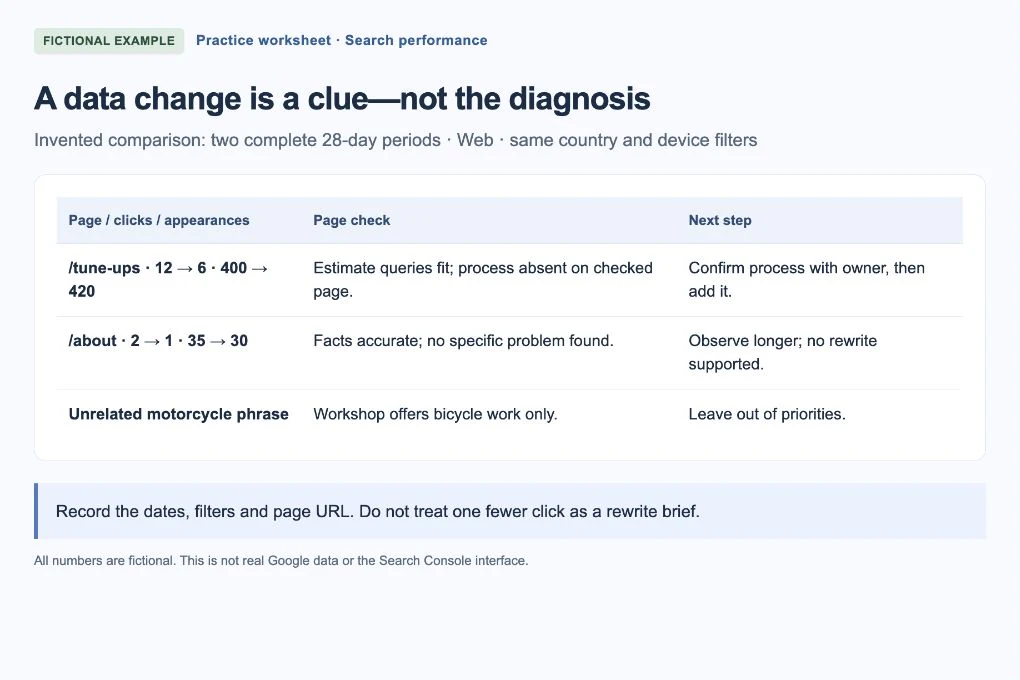
Read the published title and main content. Does it answer the relevant question, and can someone find the next step? The fictional worksheet below separates a measurable change from a possible explanation. A low CTR alone does not prove that the title or description is bad.
 Open larger image ↗
Example screen Invented numbers for a worked example, not real Google data or a screenshot of Search Console. Keep filters and dates with your observations. Choose the smallest supported task
Write the page URL, query group, dates, filters, observed counts and the specific page issue you confirmed. Example: “Estimate-process searches reach /tune-ups; the page does not explain how to request an estimate. Add the owner-confirmed process.” If the page already answers clearly, keep it and record “no content change supported.”
Save a baseline and review later
Export or note the filtered view before editing. Record the change date and allow enough comparable data to accumulate before judging it. Use the same filters on recheck and account for seasonality or service changes. More clicks after an edit are encouraging, but do not prove the edit caused them.
Worked example: what would you tackle first?
These are invented observations for Maple Street Bike Repair, not data from a live site. Both periods use the same Web, country and device scope. The page inspection supplies the missing context.
| Saved observation | What the page check finds | Reasonable decision |
|---|---|---|
| /tune-ups: clicks 12 → 6; impressions 400 → 420 | Relevant estimate queries appear; the page omits the actual estimate process | Confirm the process with the owner, then add it to this page. Do not promise a traffic gain. |
| /about: clicks 2 → 1; impressions 35 → 30 | Business facts remain accurate; no concrete page problem found | Observe for longer. One fewer click is not a rewrite brief. |
| /motorcycle-repairs: phrase suggested elsewhere, no page data | The bicycle workshop does not offer motorcycle work | Leave it out. A tempting phrase does not establish service relevance. |
Know what these numbers cannot tell you
Not every query is shown, and chart and table totals may differ because of grouping and privacy limits. A missing phrase is not proof of zero searches. Check the report’s notes and freshness before interpreting a gap.
When keeping exports, preserve unavailable states separately: Google warns that some values displayed as ~ or a dash can become zeros in a downloaded file. An unavailable comparison is not a measured zero. Avoid sharing exports that expose private business information.
If you get stuck
There is almost no data
Confirm the property, date range and filters. Check an important page’s indexing separately. If the site is new, collect more data and start with truthful customer-facing improvements rather than invented traffic projections.
The whole site is down, not just one page
Check comparable dates, seasonal demand, availability and any site-wide technical change. Do not rewrite every title because a single total declined.
I cannot reproduce the average position in a Google search
Position is averaged across recorded results and context. A personal search today is a different observation. Keep the original dates and filters with the number.
Your finish-line check
You have one page URL, a relevant query group, comparable dates and an observed reason to review the page—or an honest decision to wait. That is more useful than a long list of “high priority” keywords. AI Search Signal subscribers can also read connected Search Console data in the dashboard, but the manual workflow above does not require our paid tools.